
Aurora Workflow
Your workflow, beside you.
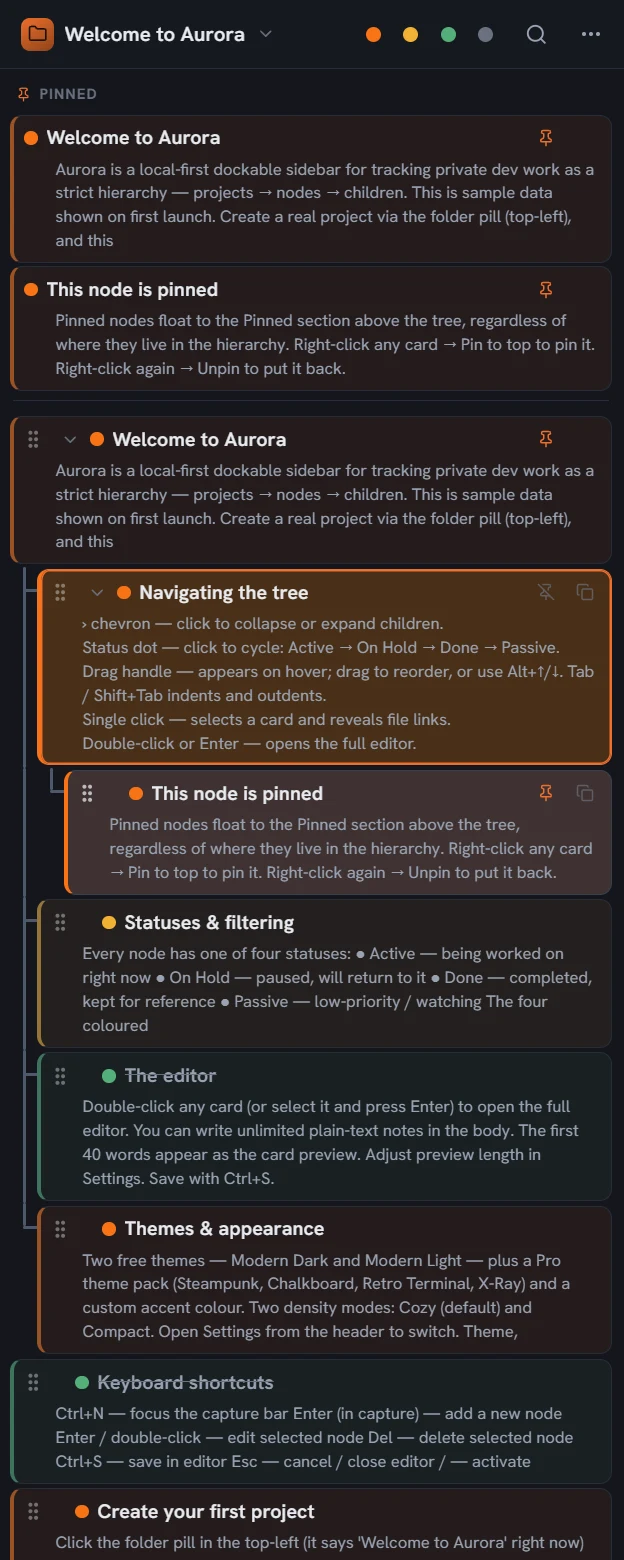
Aurora is a local-first sidebar workflow manager for Windows: your projects, notes, and tasks live in a dockable panel that is always beside your work — and stay on your machine, which makes it a natural fit for professions handling confidential work, from law and accounting to medicine and research. Public 1.0.0 is upcoming; the waitlist is open on auroraworkflow.com.
What it does
-
Dockable sidebar
Dock left or right — with auto-hide and a launcher, it's there when you need it and gone when you don't.
-
Projects, notes, tasks
A project → node tree with an editor, statuses, and search — the working memory of your day, one keystroke away.
-
Local-first & private
Your data lives on your machine — nothing leaves it. Project encryption and password locks are coming to Pro.
-
Free to start
The Free tier is genuinely useful — sidebar, projects, local backup, JSON import/export, and keyboard shortcuts. No account needed.
Good to know
- Free tier: no account needed, limited project count
- Pro (subscription, monthly / annual): unlimited projects and nodes, premium themes, custom accent colour, global quick-capture hotkey, Markdown export, configurable auto-backup
- Coming to Pro: project encryption and password locks, templates, PDF export, hosted end-to-end-encrypted Sync
- Pro Lifetime: all local Pro features forever, one-time — excludes the future hosted Sync
- One Pro license covers 3 machines
- Works offline with a ~30-day grace window
- Localization is free for everyone — languages are never gated
No prices here by design — pricing lives where checkout lives, on the product site.